
GuyID Date Mode Link: How It Works — One Link, Verified Everywhere (2026)
Every dating safety guide eventually arrives at the same advice: “Verify the person’s identity before meeting.” But until now, no tool existed that made identity verification shareable, checkable, and portable across every dating platform and every conversation channel. The GuyID Date Mode link is that tool — a single URL that displays your verified Trust Profile to anyone who clicks it, on any device, on any platform, with no app download or account creation required. It’s the practical mechanism behind portable dating verification: the link that makes government-verified identity, social vouching, and Trust Tiers accessible from a Hinge prompt, a WhatsApp message, a text, or a QR code held up at a coffee shop. Understanding how the Date Mode link works transforms abstract trust concepts into a concrete, daily-use dating safety tool.
This guide explains everything about the Date Mode link: what it shows, how it’s generated, where it works, what the viewer sees, how it protects both the sharer and the checker, and how it fits into the complete proactive dating safety framework.
What Is the Date Mode Link?
The Date Mode link is a unique URL generated for every GuyID user that displays their public-facing Trust Profile — the verified trust information intended for dating contexts. It’s the shareable front door to your verified identity.
The Basics
- Format: A standard web URL — looks like any other link, clickable from any platform or channel.
- Unique per user: Each GuyID profile has one Date Mode link — your permanent, personal trust URL.
- Always current: The link always displays your current Trust Tier and verification status. If you advance from BUILDER to TRUSTED, anyone clicking the link sees TRUSTED immediately — no need to reshare.
- No expiration: Your Date Mode link remains active as long as your GuyID profile is active. Share it once in your dating app bio and it works for every match who views your profile, indefinitely.
What It’s For
The Date Mode link serves one purpose: enabling anyone you share it with to verify your identity and trust status instantly. It’s the answer to “How do I know you’re who you say you are?” — a question that every dating interaction implicitly asks and that no dating app badge adequately answers.
What the Viewer Sees When They Click Your Date Mode Link
When someone — a match, a potential date, anyone you’ve shared the link with — clicks your Date Mode link, they see a clean, immediately understandable Trust Profile displaying four key trust dimensions.
Trust Tier
Your current tier — GHOST, STARTER, BUILDER, TRUSTED, ELITE, or LEGEND — displayed prominently. The tier communicates your overall verified trustworthiness at a glance: GHOST means nothing verified, TRUSTED means government ID confirmed plus social vouches received, LEGEND means maximum verification across all dimensions. The tier name is intuitive — no explanation needed for the viewer to understand the trust level.
Government ID Verification Status
A clear indicator of whether government ID verification has been completed — biometric matching against an official document confirmed. This tells the viewer whether the person’s legal identity has been verified through the same standard used in banking and financial services. For the viewer, this is the most critical data point: “Is this person’s identity confirmed by government documents?”
Anti-Scammer Badge
The Anti-Scammer Badge activates when government ID verification is complete. It’s the visual shorthand for the most important safety confirmation: “This person has proven their real identity.” The badge directly addresses the fear that 92% of women carry into dating interactions — the fear that the person they’re talking to isn’t who they claim.
Social Vouches
The number and presence of real people who have confirmed the user’s identity and vouched for their character. Each vouch represents a real human who said: “I know this person, they are who they claim, and I trust them enough to attach my name to theirs.” The viewer sees that real humans — not just documents and algorithms — confirm this person’s trustworthiness.
The Combined Experience
In approximately 10 seconds of viewing, the person checking your Date Mode link learns: your Trust Tier (how much trust has been verified), whether your government ID is confirmed (are you legally who you claim), whether you have the Anti-Scammer Badge (is your identity proven), and how many real people vouch for you (does your community trust you). This is more actionable trust information than any dating app badge provides — delivered in less time than it takes to read a bio.

How Date Mode Protects Your Privacy
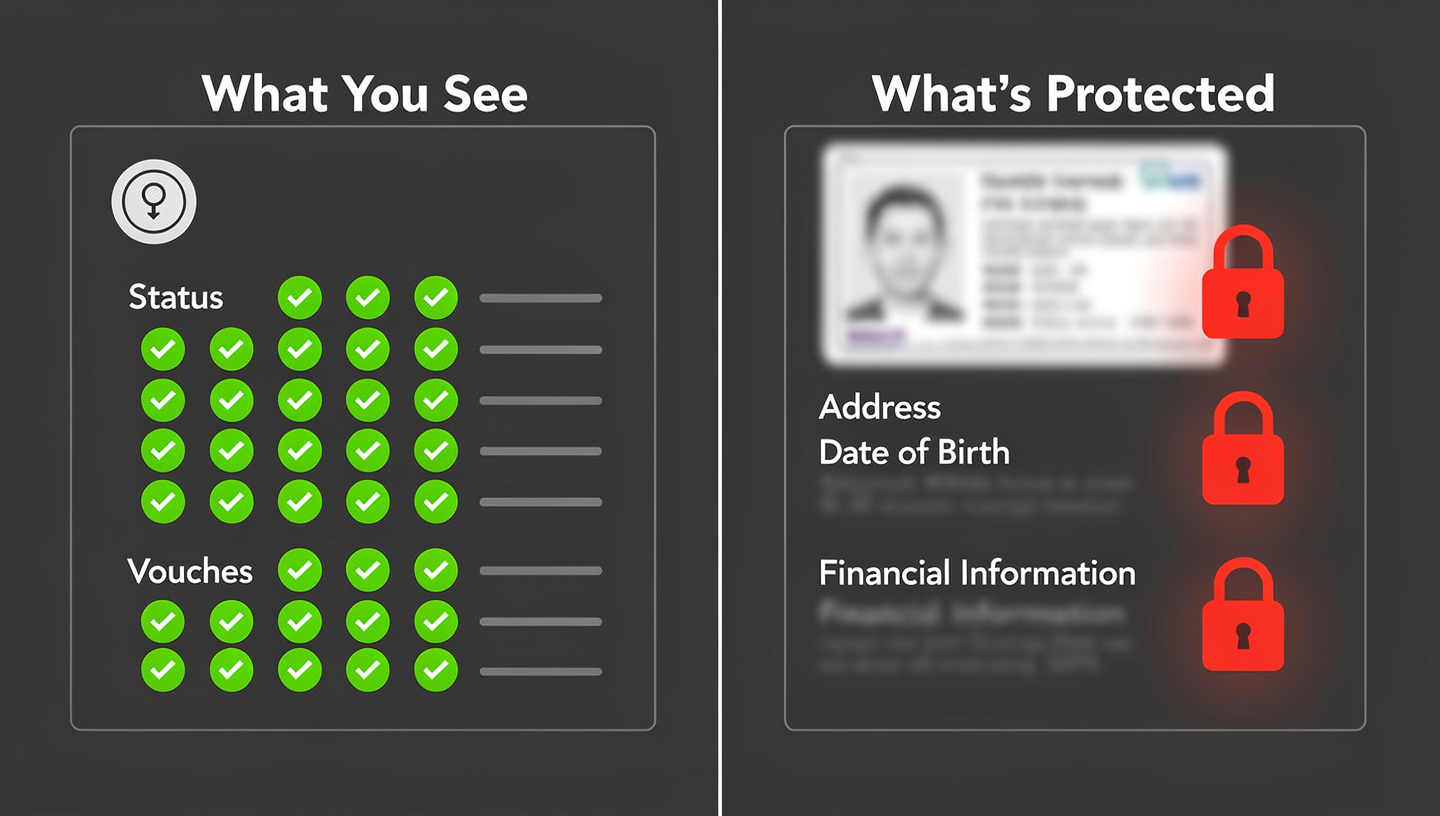
A critical design principle of the Date Mode link: it shows verification status without exposing sensitive personal data.
What Date Mode Shows
- Trust Tier (the tier name, not the underlying points)
- Government ID verification status (confirmed or not — a binary signal)
- Anti-Scammer Badge (present or absent)
- Social vouch indicators
What Date Mode Does NOT Show
- ❌ Your government ID document images
- ❌ Your ID number, passport number, or driver’s license number
- ❌ Your full legal name (unless you choose to display it)
- ❌ Your home address or any location data
- ❌ Your date of birth
- ❌ Your financial information
- ❌ The identities of your vouchers (their participation is private unless they choose otherwise)
The Date Mode link communicates the conclusion (“identity verified, character vouched, trust established”) without exposing the evidence (documents, personal data, voucher identities). The viewer gets the trust information they need for safety decisions. The sharer’s sensitive data remains private. This privacy-by-design approach is why sharing your Date Mode link is safe — you’re sharing your trust status, not your personal documents.
Traditional identity verification in other contexts (banking, employment) requires showing documents directly. GuyID’s consent-based model provides the trust conclusion without document exposure. The person checking your profile sees “government ID verified ✅” — not a photo of your driver’s license. You prove your identity without revealing your identity documents. Trust without exposure.
Where the Date Mode Link Works
The Date Mode link is platform-agnostic — it works anywhere a URL can be shared or clicked. Here’s the complete channel coverage.
| Channel | How to Share | Viewer Experience |
|---|---|---|
| Hinge | Paste in a prompt answer | Match taps link → Trust Profile opens in browser |
| Bumble | Paste in bio section | Match taps link → Trust Profile opens in browser |
| Tinder | Paste in bio | Match taps link → Trust Profile opens in browser |
| Send as message with link preview | Match taps link → Trust Profile opens in-app browser | |
| Text / SMS | Send as text message | Match taps link → Trust Profile opens in phone browser |
| Add to bio or send in DM | Match taps link → Trust Profile opens in browser | |
| Include in message body | Recipient clicks link → Trust Profile opens in browser | |
| In person | QR code on phone screen | Date scans QR → Trust Profile opens on their phone |
| Any other channel | Paste URL or share QR code | Standard browser experience — universal compatibility |
Every channel works the same way: share the link → viewer clicks → Trust Profile displays. No app download required. No account creation required. No login required. The zero-friction design means checking someone’s Trust Profile is as easy as clicking any other link — removing the adoption barrier that would make portable verification impractical.
How to Get Your Date Mode Link
Getting your Date Mode link is part of the GuyID profile creation process. Here’s the path.
- Create your GuyID profile: Visit guyid.com, create your account, and complete your profile. (~5 minutes)
- Begin verification: Initiate government ID verification and send social vouch requests. (ID: ~2-5 minutes. Vouches: send requests in ~5 minutes, wait for responses.)
- Your Date Mode link is generated: Once your profile exists, your unique Date Mode URL is available — you can share it at any tier, though the trust signal is strongest at TRUSTED or above.
- Copy and share: Copy the link from your GuyID dashboard and paste it wherever you date — bios, prompts, messages, texts.
The link works at any tier — even GHOST. But the trust information it communicates is proportional to your tier: a GHOST link shows “no verification completed” (not very compelling), while a TRUSTED link shows “government ID verified + social vouches received” (the comprehensive trust signal). Build to TRUSTED before actively sharing for maximum impact.
Strategic Sharing: Where to Place Your Date Mode Link for Maximum Impact
Where you place your Date Mode link determines how many people see your verified status and at which moments in the dating journey.
Passive Placement (Always-On Visibility)
- Hinge prompt: The most-read profile element on the most relationship-focused platform. Every person who views your profile sees your Trust Profile link. The sharing guide provides ready-to-use prompt templates.
- Bumble bio: Visible to every potential match before they decide to swipe. Adding GuyID on top of Bumble’s own badge creates the strongest combined trust signal.
- Tinder bio: On the platform with 50% of malicious activity, your verified link differentiates you from the scam-dense environment.
- Instagram bio: Visible to matches who click through from dating apps to check your social presence.
Active Sharing (Targeted High-Impact Moments)
- At the WhatsApp transition: The highest-impact single sharing moment. “Here’s my number — and here’s my verified identity: [link].” Fills the off-platform gap at the exact moment safety vanishes.
- Before meeting in person: “Before we meet, here’s my trust profile: [link].” The pre-date verification that confirms identity before physical proximity.
- When trust is discussed: If safety comes up in conversation, your Date Mode link provides evidence rather than promises.
- When asked directly: “Are you who you say you are?” → “Here — see for yourself: [link].” Instant, confident, verifiable.
What Different Trust Tiers Look Like in Date Mode
The Trust Profile display changes meaningfully based on your tier — communicating proportionally different trust information to the viewer.
| Your Tier | What the Viewer Sees | Trust Signal Strength | Recommended Action |
|---|---|---|---|
| GHOST | Account exists, nothing verified | Minimal | Don’t actively share — build to STARTER first |
| STARTER | Profile completed, intent demonstrated | Low | Can mention in conversation — but complete ID verification soon |
| BUILDER | Verification in progress | Medium | Shareable — shows active trust investment. Complete verification for full impact |
| TRUSTED | Gov ID verified ✅ + Social vouches ✅ + Anti-Scammer Badge ✅ | High — the meaningful threshold | Share everywhere — this is the tier where the Date Mode link delivers full value |
| ELITE | Deeply verified + broad vouching + sustained consistency | Very High | Share everywhere — premium trust signal for serious relationship seekers |
| LEGEND | Maximum verification across all dimensions | Highest | Share everywhere — the gold standard of verified dating trust |
The key insight: Date Mode link value is proportional to your tier. TRUSTED is the practical threshold — the tier where the link provides government ID confirmation, social vouches, and the Anti-Scammer Badge. Below TRUSTED, the link shows intent but not confirmation. At TRUSTED and above, it provides the comprehensive trust signal that outperforms every dating app badge.
Date Mode vs Dating App Badges: What the Viewer Actually Experiences
The difference between checking a dating app badge and checking a Date Mode link is the difference between one bit of information and a comprehensive trust dossier.
The Badge Experience
The viewer sees a small icon on the dating profile: ✅ verified. They learn: a selfie matched profile photos. That’s it. No additional information. No detail about what “verified” means. No graduation. No character assessment. No off-platform persistence. Time: 0 seconds to notice. Information density: one binary data point.
The Date Mode Experience
The viewer clicks a link and sees: Trust Tier (how much trust is verified), government ID status (is legal identity confirmed), Anti-Scammer Badge (is real identity proven), and social vouches (do real people confirm this person). They learn: this person’s identity is confirmed by government documents, real humans vouch for their character, and they’ve maintained this verification consistently. Time: ~10 seconds to review. Information density: four multi-dimensional trust signals.
The Decision Quality Difference
A trust decision based on a badge uses one binary data point about photo similarity. A trust decision based on a Date Mode Trust Profile uses four verified trust dimensions — identity, character, consistency, and tier progression. The same decision (should I trust this person?) informed by radically different information quality. This is why the dating trust score model represents an evolution beyond binary badges — and why the Date Mode link is the practical mechanism that delivers this evolution to every dating interaction.
Summary: One Link. Verified Everywhere.
The GuyID Date Mode link is the practical implementation of everything the portable dating verification concept promises: a single URL that displays your verified Trust Profile to anyone, on any device, on any platform, with no app or account required. It shows your Trust Tier, government ID status, Anti-Scammer Badge, and social vouches — all while protecting your private data through privacy-by-design that communicates trust conclusions without exposing sensitive documents.
The link works on every channel — dating apps, WhatsApp, text, Instagram, email, and in person via QR code. It’s always current (tier advancement reflects immediately), never expires, and costs nothing for women to check. At TRUSTED tier and above, it provides the comprehensive trust information that no dating app badge delivers: government-verified identity, character vouched by real humans, and sustained trustworthiness demonstrated over time.
The gap between what a dating app badge tells you (“a selfie matched photos”) and what a Date Mode link tells you (“this person’s identity is government-verified, their character is vouched by real people, and they’ve maintained trustworthiness at [tier]”) is the gap between hoping someone is real and knowing someone is verified. One link closes that gap — everywhere, for everyone, always.
Get your Date Mode link at guyid.com. Build to TRUSTED. Share everywhere you date. One link. Verified everywhere.
Your GuyID Date Mode link: government ID verified, social vouches visible, Trust Tier displayed — all in one shareable URL. Works on Hinge, Bumble, Tinder, WhatsApp, text, Instagram, and in person. No app required to check. Women check for free.
Frequently Asked Questions: Date Mode Link
What is a GuyID Date Mode link?
Does someone need a GuyID account to check my Date Mode link?
Does my Date Mode link show my personal documents?
When should I share my Date Mode link?
What Trust Tier should I reach before sharing my Date Mode link?
Does the Date Mode link update automatically when my tier advances?
Can I use the Date Mode link as a QR code?
How is the Date Mode link different from a dating app verification badge?

Founder, GuyID · Dating Safety Researcher · 13+ Years in Data Analytics
Ravishankar Jayasankar is the founder of GuyID, a consent-based dating trust verification platform. With 13+ years in data analytics and a deep focus on consumer trust, Ravi built GuyID to close the safety gap in digital dating. His research found that 92% of women report dating safety concerns — validating GuyID’s mission to make online dating safer through proactive, consent-based verification. GuyID offers government ID verification, social vouching, a Trust Tiers system, and 60+ free interactive safety tools.